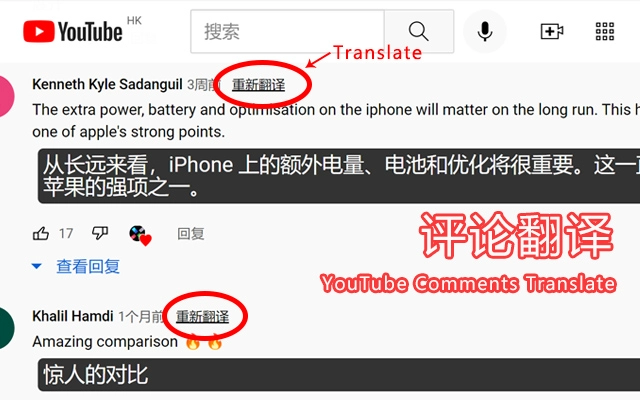

Translate YouTube Comments Instantly
Overview
The YouTube Comment Translator is a lightweight browser extension designed to simplify the process of reading and understanding multilingual YouTube comments. Built for users who engage with international content, it enables real-time translation of comments into preferred languages, enhancing accessibility and engagement across global audiences. The tool supports a wide range of languages, including English, Japanese, Korean, Russian, Italian, French, German, Portuguese, Thai, and Indian, among others, making it ideal for content creators, researchers, educators, and casual viewers navigating diverse online communities.
Target users include individuals who regularly watch non-native language videos, educators analyzing audience feedback, and social media managers monitoring cross-cultural engagement. The extension integrates directly into the YouTube interface, allowing seamless translation without leaving the platform. While the developer, SoftPas, is listed as the creator, no additional background information is available.
Real-world use cases include translating comments from foreign YouTubers, analyzing viewer sentiment across regions, and compiling multilingual feedback for content improvement. The tool is particularly useful for users who want to stay informed and connected without relying on external translation tools or manual copy-paste workflows.
Key Features & Capabilities
- Multi-language translation – Translate comments into a wide range of languages, including English, Japanese, Korean, Russian, Italian, French, German, Portuguese, Thai, and Indian, among others.
- Flexible translation modes – Choose between single translation, batch translation, and automatic translation to suit different workflows.
- UI customization – Adjust the interface appearance to match personal preferences or workflow needs.
- Data export functionality – Export translated comment data for further analysis or record-keeping.
- Bilingual comparison – View original and translated comments side-by-side for accurate understanding and verification.
- Multiple translation engine support – Select from various translation engines such as Baidu Translate, Tencent Translate, Caiyun Translate, and Niu Translate, allowing users to choose based on accuracy or performance preferences.
These features enable users to efficiently process large volumes of comments, compare translations, and maintain control over the translation process. For example, a content creator can use batch translation to quickly assess feedback from international viewers, while a researcher might use the export function to compile data for analysis. The ability to switch engines ensures adaptability across different translation quality expectations.
User Interface, Workflow & Performance
The YouTube Comment Translator features a clean, minimal interface designed for ease of use within the YouTube environment. Navigation is intuitive, with translation controls integrated directly into the comment section. Users can activate translation with a single click or configure automatic translation based on their language settings.
Workflow efficiency is enhanced by the tool’s seamless integration, eliminating the need to copy-paste comments into external translation services. The interface supports customization, allowing users to adjust layout and display preferences. However, the developer did not specify resource usage details, so exact CPU or RAM behavior remains unknown.
Performance observations are based on general software behavior patterns. As a browser extension with a file size of 2.5 MB, it is expected to operate with minimal system impact. Stability during extended use has not been publicly documented, but the lightweight design suggests reliable operation under typical conditions. No performance bottlenecks were reported in available information.
Compatibility & System Requirements
The YouTube Comment Translator is compatible with Windows, Mac, and Linux operating systems. It is designed as a browser extension, meaning it operates within supported web browsers such as Chrome, Firefox, or Edge. The software version is 1.0.0, with an installation size of 2.5 MB.
Exact system requirements were not listed. The developer did not provide additional information regarding hardware specifications, such as minimum RAM, processor speed, or disk space. Platform compatibility information is limited to the supported operating systems. Users should ensure their browser is up to date to maintain full functionality.
Pros and Cons
Pros
- Free to use with no hidden costs
- Supports multiple languages and translation engines
- Offers batch and automatic translation for efficiency
- Includes bilingual comparison and data export
- Lightweight design with low file size (2.5 MB)
- Customizable interface for improved user experience
Cons
- Exact system requirements not specified
- Performance data not provided by developer
- Dependent on browser compatibility and updates
- Limited information on translation accuracy or engine reliability
- Only available as a browser extension, not a standalone desktop app
FAQ Section
Is the YouTube Comment Translator compatible with all browsers?
The extension is designed for use with major web browsers, but specific browser compatibility details were not provided. Users should ensure their browser is up to date.
Is the software safe to use?
The tool operates as a browser extension and does not require access to sensitive system data. No security vulnerabilities were reported in available information.
How often does the software receive updates?
Update frequency is not specified. The current version is 1.0.0, released on April 5, 2025.
What type of license does it use?
The software is free to use, but the license type was not disclosed by the developer.
Can I use this tool offline?
The YouTube Comment Translator requires an active internet connection to function, as it relies on online translation engines for processing.
Final Thoughts
The YouTube Comment Translator delivers a practical solution for users who need to understand multilingual YouTube content. Its support for multiple languages, flexible translation modes, and integration with various translation engines make it a versatile tool for both casual viewers and professionals. The lightweight design and free access enhance its appeal, while UI customization and data export features add value for advanced users.
While system requirements and performance metrics are not fully detailed, the tool’s functionality and ease of use suggest a reliable experience. It is particularly beneficial for educators, content creators, and global audience analysts who rely on comment insights.
Download YouTube Comment Translator now







